Installation
Introduction
Mobilewright is an end-to-end testing framework for mobile applications. It provides a TypeScript API for automating iOS and Android devices, with built-in auto-waiting, assertions, and test reporting.
- Cross-platform — iOS and Android, simulators, emulators and real devices
- Auto-waiting — No manual waits or sleeps
- TypeScript-first — Full type safety and autocompletion
- Agent-ready — Built for AI agent integration
Requirements
Mobilewright drives real simulators, emulators and devices, so it needs a working mobile toolchain on your machine before the first test can run.
Everywhere
- Node.js 22.12 or newer.
- A booted simulator or emulator, or a device connected over USB. Mobilewright does not start one for you.
For iOS
- macOS 13 or newer.
- Xcode, plus the Xcode Command Line Tools.
For Android
- A JDK, version 11 or newer.
- The Android SDK, with
ANDROID_HOMEset andadbon yourPATH. - Works on macOS and Windows 11. On Windows, follow Setting up on Windows. On Linux, run Android tests through the Docker image.
You do not need to install mobilecli — it ships with the mobilewright package as a per-platform binary.
Check your setup
mobilewright doctor verifies all of the above and tells you how to fix whatever is missing. Run it before anything else:
npx mobilewright doctor
mobilewright doctor  v0.0.1
────────────────────────────────────────────────────────────

  System
    ✓  macOS  macOS 15.7.4  [Apple Silicon (arm64)]
    ✓  Git  2.50.1 (Apple Git-155)
    ✓  Node.js  v22.19.0
    ✓  npm  10.9.3
    ✓  mobilecli  mobilecli version 0.3.66
    ✓  mobilecli devices  2 online devices
       iPhone (00008030-000E1D892340802E)
       iPhone 17 Pro (6A557392-1480-4355-9EBC-B1D12A0F665D)

  iOS
    ✓  Xcode  26.0.1 (17A400)
    ✓  Xcode Command Line Tools  /Applications/Xcode.app/Contents/Developer
    ✓  iOS Simulators  62 available, 2 booted

  Android
    ✓  Java (JDK)  21.0.10
    ✓  JAVA_HOME  /Library/Java/JavaVirtualMachines/temurin-21.jdk/Contents/Home
    ✓  ANDROID_HOME  /Users/john/Library/Android/sdk
    ✓  ADB (Android Debug Bridge)  1.0.41
    ✓  ADB Devices  0 devices connected
    ✓  Android Emulator  36.1.9.0
    ✓  Android SDK Platforms  API 35 (latest)  [4 platforms installed]
    ✓  Android Build Tools  35.0.0 (latest)  [3 versions installed]

────────────────────────────────────────────────────────────
  Summary  17 ok
  ✓ Ready for mobile development!
Every failing check comes with the commands that resolve it. See Troubleshooting for the full breakdown and for --json output.
Installing Mobilewright
Scaffold a new project:
npm init mobilewright@latest
This asks three questions — TypeScript or JavaScript, the directory to put tests in (default tests), and the bundle ID of the app under test — then writes the project files and runs npm install for you. If it finds an Xcode or Gradle project nearby it pre-fills the bundle ID.
To add Mobilewright to a project that already has a package.json, install it directly instead:
npm install --save-dev mobilewright @mobilewright/test
Directory layout
After scaffolding, your project looks like this:
mobilewright.config.ts
package.json
package-lock.json
tests/
  example.spec.ts
The generated mobilewright.config.ts sets the target platform, app bundle ID, and device. platform is required — tests fail to start without it:
import { defineConfig } from 'mobilewright';

export default defineConfig({
  platform: 'ios',
  bundleId: 'com.example.myapp',
  deviceName: /iPhone/,
  timeout: 30_000,
});
And tests/example.spec.ts contains a starter test:
import { test, expect } from '@mobilewright/test';

test('app launches and shows home screen', async ({ screen, device }) => {
  await expect(screen.getByText('Welcome')).toBeVisible();
});
This test asserts on the text Welcome, which almost certainly is not on your app's first screen — change it to something your app actually shows before running it.
Choosing a device and installing your app
Edit bundleId to your app's bundle identifier and deviceName to match the device you want. Add installApps to install a build before the test runs:
import { defineConfig } from 'mobilewright';

export default defineConfig({
  platform: 'ios',
  bundleId: 'com.example.myapp',
  deviceName: /iPhone 16/,
  installApps: './builds/myapp.ipa',
  timeout: 30_000,
});
installApps takes a path to an .ipa or .apk and installs it on the device before launching. If your app is already installed, leave it out and set bundleId only. Configuration documents every option.
Running tests
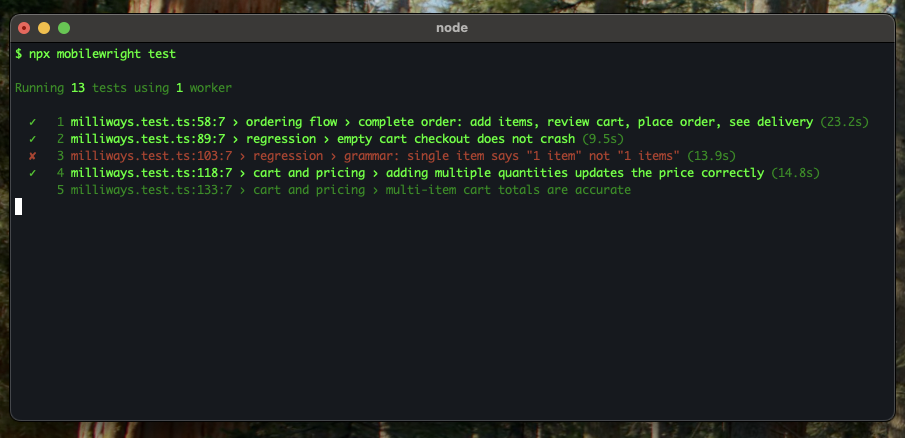
Run the example test:
npx mobilewright test
HTML test reports
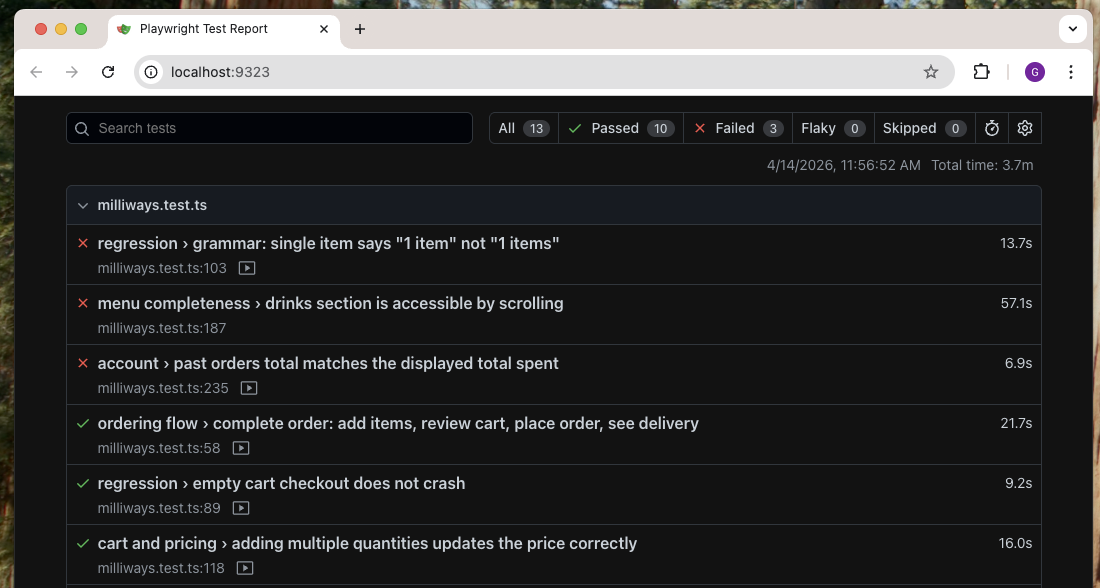
Run tests with the HTML reporter:
npx mobilewright test --reporter html
After the test run, open the report:
npx mobilewright show-report
This starts a local server at localhost:9323 with an interactive report where you can filter results, inspect errors, and view screenshots.
What's next
- Setting up on Windows — Node, Android SDK and hardware acceleration on Windows 11.
- Writing Tests — locators, actions and assertions.
- Running Tests — filtering, reporters and exit codes.
- Configuration — every config option.
- Inspector — explore a live screen and find locators.
- Setting up CI — run the suite on every push.