Playwright for mobile

Playwright for native iOS and Android apps

Playwright drives browsers, so it can't reach a native app. Mobilewright gives you the same API, the same test runner and the same HTML report for iOS and Android apps, on simulators, emulators and real devices.

Last updated:

Can Playwright test native mobile apps?

No. Playwright automates Chromium, Firefox and WebKit. Its mobile support emulates a phone's viewport, user agent and touch events in a desktop browser, which tests a website at phone size, not an app from the App Store or Google Play. Its experimental Android support reaches Chrome and web views, not native screens, and there is no native iOS support.

Native screens aren't a DOM, so a browser tool has nothing to query. Mobilewright reads the accessibility tree that iOS and Android expose instead, and puts the Playwright API on top of it: the same locators, auto-waiting, assertions, runner and reports, with tap() where you'd click().

The same test, side by side

Playwright, a web page

import { test, expect } from '@playwright/test';

test('can sign in', async ({ page }) => {
  await page.goto('https://example.com/login');
  await page.getByLabel('Email').fill('user@example.com');
  await page.getByLabel('Password').fill('password123');
  await page.getByRole('button', { name: 'Sign In' }).click();

  await expect(page.getByText('Welcome back')).toBeVisible();
});

Mobilewright, a native app

import { test, expect } from '@mobilewright/test';

test('can sign in', async ({ screen }) => {
  await screen.getByLabel('Email').fill('user@example.com');
  await screen.getByLabel('Password').fill('password123');
  await screen.getByRole('button', { name: 'Sign In' }).tap();

  await expect(screen.getByText('Welcome back')).toBeVisible();
});

No page.goto()

The app to test comes from mobilewright.config.ts. Mobilewright finds a booted simulator, emulator or connected device that matches, and launches the app fresh before each test.

import { defineConfig } from 'mobilewright';

export default defineConfig({
  platform: 'ios',
  bundleId: 'com.example.myapp',
  deviceName: /iPhone/,
});

Playwright concepts in Mobilewright

DimensionMobilewrightPlaywright
Test package@mobilewright/testExtends Playwright Test with screen and device fixtures@playwright/test
Configmobilewright.config.tsdefineConfig from 'mobilewright'playwright.config.ts
Run testsnpx mobilewright testnpx playwright test
What you drivescreen fixtureThe app's current screenpage fixture
Browser / contextdevice fixtureLaunch and terminate apps, deep links, orientation, geolocationbrowser, context
Launchersios.launch(), android.launch()chromium.launch(), firefox.launch(), webkit.launch()
NavigationbundleId in the config launches the appdevice.goto('myapp://settings') opens deep linkspage.goto(url)
Clicklocator.tap()Plus doubleTap(), longPress(), swipe()locator.click()
LocatorsgetByRole, getByText, getByLabel, getByTestId, getByPlaceholderRoles map to native element types; getByType for raw typesgetByRole, getByText, getByLabel, getByTestId, getByPlaceholder
Auto-waitingEvery action waits until the element is visible, enabled and stableActionability checks before every action
Assertionsexpect(locator).toBeVisible(), toHaveText(), expect.soft, expect.pollRetry until they pass or time outexpect(locator).toBeVisible(), toHaveText(), expect.soft, expect.poll
ProjectsOne project per platform or deviceOne project per browser
CLI flags--workers, --shard, --retries, --grep, --project--workers, --shard, --retries, --grep, --project
Reportslist, html, json, junit; show-report, merge-reportsVideo and a failure screenshot attached per testlist, html, json, junit; show-report, merge-reports
Toolingnpx mobilewright codegen, npx mobilewright inspectnpx playwright codegen, Playwright Inspector
TargetsiOS simulators, Android emulators, real devices, cloud devicesChromium, Firefox, WebKit
Web contentscreen.getByWebView().page() returns a Playwright-compatible PageFor web views inside your apppage

What carries over

  • The test runner. @mobilewright/test is built on Playwright Test, so test(), test.describe, hooks, fixtures, test.use, projects, workers, retries and sharding work the way you expect.
  • Locators and assertions. The same getBy* names, chaining and filter(), first(), nth(), and retrying expect matchers with .not, expect.soft and expect.poll.
  • Reports and CI. The list, html, json and junit reporters, show-report and merge-reports. The HTML report is Playwright's, with a video of each test.
  • Web views. Inside a hybrid app, getByWebView().page() runs Playwright's own engine in the web view and returns an object that implements Playwright's Page.

What's different

  • You tap, not click. Locators also have doubleTap(), longPress(), swipe(), fill() and check().
  • There's no URL to open. The config's bundleId launches your app; the device fixture launches other apps, opens deep links and sets orientation or GPS location.
  • Native screens have no DOM, so there are no CSS or XPath selectors. Roles map to native element types (button, textfield, switch, listitem and more), and getByType reaches the raw type.
  • Tests need a device. iOS simulators need macOS and Xcode. Android runs on macOS, Windows 11 and, through the Docker image, Linux. Real devices work locally over USB or in the cloud.

What it looks like

One test, two platforms: npx mobilewright test runs the same cart test on an iPhone and an Android phone with two workers.
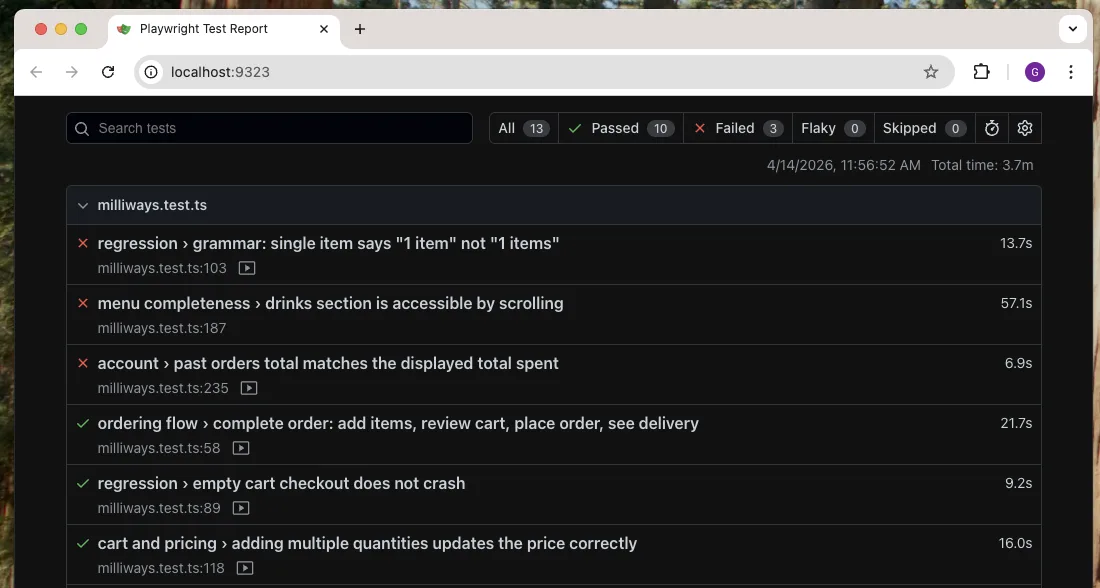
Playwright's HTML report for a Mobilewright run: 13 tests, 10 passed, 3 failed, each with its duration and a recorded video
npx mobilewright show-report opens Playwright's HTML report, with a video of every test.
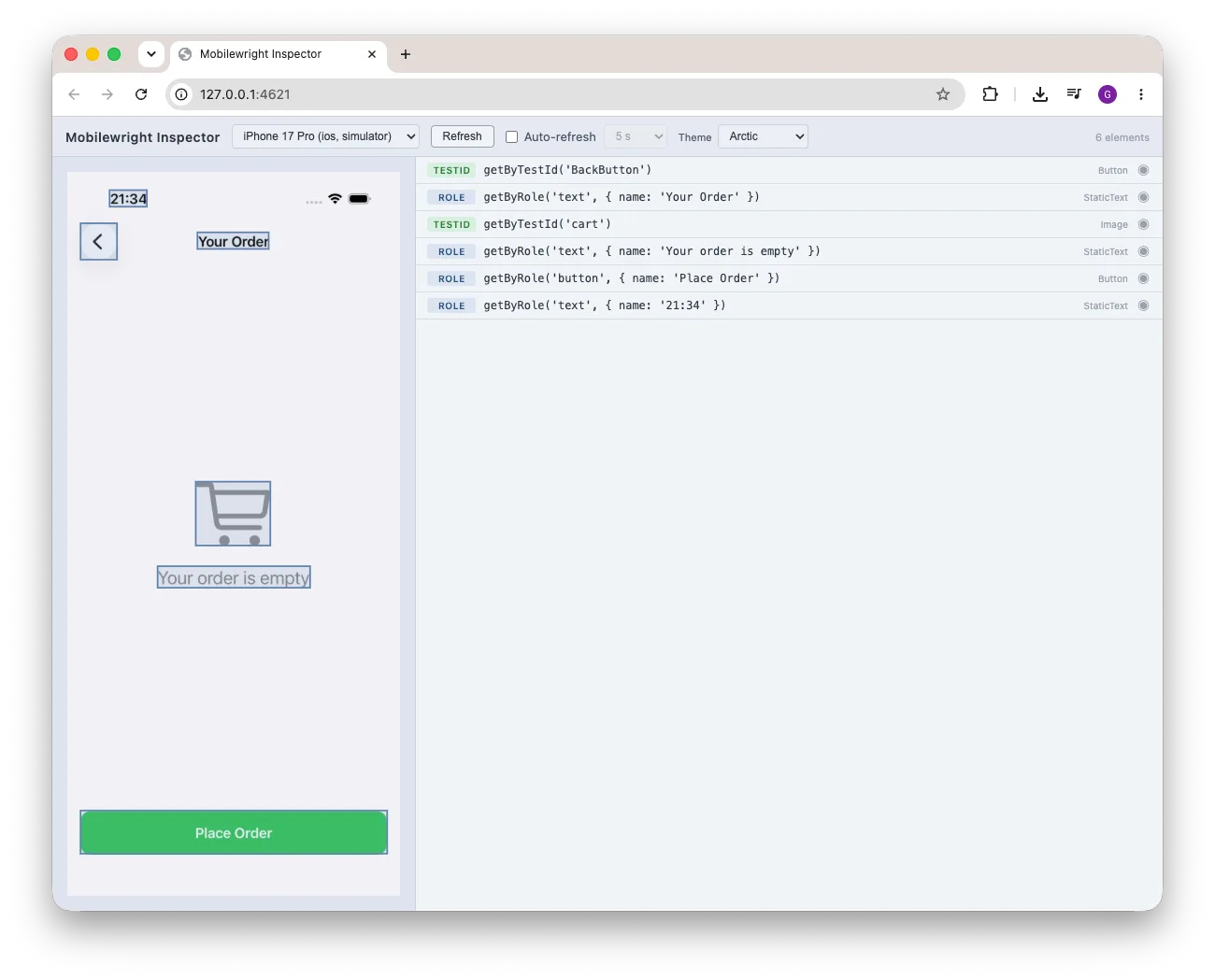
Mobilewright Inspector: a live iPhone simulator screen next to the locator for every element, such as getByRole('button', { name: 'Place Order' })
npx mobilewright inspect shows the live screen and the locator for every element, like the Playwright Inspector's pick locator.

Try it in three commands

npm init mobilewright@latest writes the config, installs dependencies and adds an example test. Needs Node.js 22.12 or newer. To try it without your own app, use Milliways, our sample app.

Read the docs · Setting up on Windows · Cloud devices

$ npm init mobilewright@latest
$ npx mobilewright doctor   # checks Xcode, Android SDK, simulators, ADB
$ npx mobilewright test

Frequently asked questions

Can Playwright test native iOS and Android apps?

No. Playwright automates Chromium, Firefox and WebKit. Its mobile support emulates a phone's viewport and user agent in a desktop browser, and its experimental Android support covers Chrome and web views, not native screens. Mobilewright is a separate open-source framework that gives native iOS and Android apps a Playwright-style API.

Is there a Playwright for native iOS apps?

Mobilewright tests native iOS apps on simulators and real iPhones with the Playwright Test runner, getByRole and getByText locators, auto-waiting actions and retrying expect assertions. iOS simulators need macOS and Xcode; from Windows or Linux, use a cloud provider.

Is there a Playwright for native Android apps?

Mobilewright tests native Android apps on emulators and real devices with the same API it uses for iOS, so one test can run on both platforms. Android tests run on macOS, Windows 11 and Linux.

Is Mobilewright built on Playwright?

Its test runner, @mobilewright/test, extends Playwright Test with screen and device fixtures, and web views are driven by Playwright's injected engine. Native screens are driven through mobilecli, which reads the platform's accessibility tree. There is no Appium server or driver to install.

Can I run my existing Playwright tests on a phone?

For a website, keep Playwright. For web content inside your app, screen.getByWebView().page() returns a Playwright-compatible Page, so web tests can run against it in a debuggable build. Native screens need tests written against screen, but the locator names, assertions, config shape and CLI flags are the ones you already use.