Mobilewright
Reliable mobile automation for testing, scripting, and AI agents.

Powered by Playwright

One deterministic API for iOS and Android.

npm init mobilewright@latestScaffolds a config and a passing test. Already have a project? npm install mobilewright

Zero to green

One command. A passing test on a real app.

npm init mobilewright detects your app's bundle ID, writes the config, installs dependencies and hands you a test that runs right away. No Appium server, no drivers, no capabilities JSON.

$ npm init mobilewright@latest
Getting started with writing mobile automation and end-to-end tests
✔ Do you want to use TypeScript or JavaScript? › TypeScript
✔ Which platform do you want to test? › iOS
✔ What is the app bundle ID to test? (detected from app.json) › com.mobilenext.Milliways
✔ Directory name for test files? › tests
Installing dependencies...
Success! Created mobilewright project.
 
$ npx mobilewright test
Running 3 tests using 1 worker
  ✓ ordering flow › complete order: add items, review cart, place order (23.2s)
  ✓ regression › empty cart checkout does not crash (9.5s)
  ✓ cart and pricing › adding multiple quantities updates the price (14.8s)
3 passed (48.0s)

Test runner + SDK

Mobilewright Test

A Playwright-style API with auto-waiting, chainable locators and retrying assertions. Parallel workers, HTML reports and video, ready to go.

await screen.getByLabel('Email').fill('user@example.com');
await screen.getByRole('button', { name: 'Sign In' }).tap();
await expect(screen.getByText('Welcome back')).toBeVisible();
Read the guide

Scaffold, run, inspect

Mobilewright CLI

Create a project, run tests and look inside any screen from your terminal. It finds your simulators, emulators and connected devices on its own.

$ npm init mobilewright@latest
$ npx mobilewright test
$ npx mobilewright inspect
CLI reference

For AI agents

Mobile MCP

The MCP server that gives Claude, Cursor and Copilot a real phone to drive, using the accessibility tree instead of screenshots.

$ claude mcp add mobile-mcp -- npx -y @mobilenext/mobile-mcp@latest
Mobile MCP on GitHub

Built for testing

Everything you love about Playwright Test, on a phone.

The same fixtures, expect, reporters and config shape. If you've written a Playwright test, you've already written a Mobilewright test.

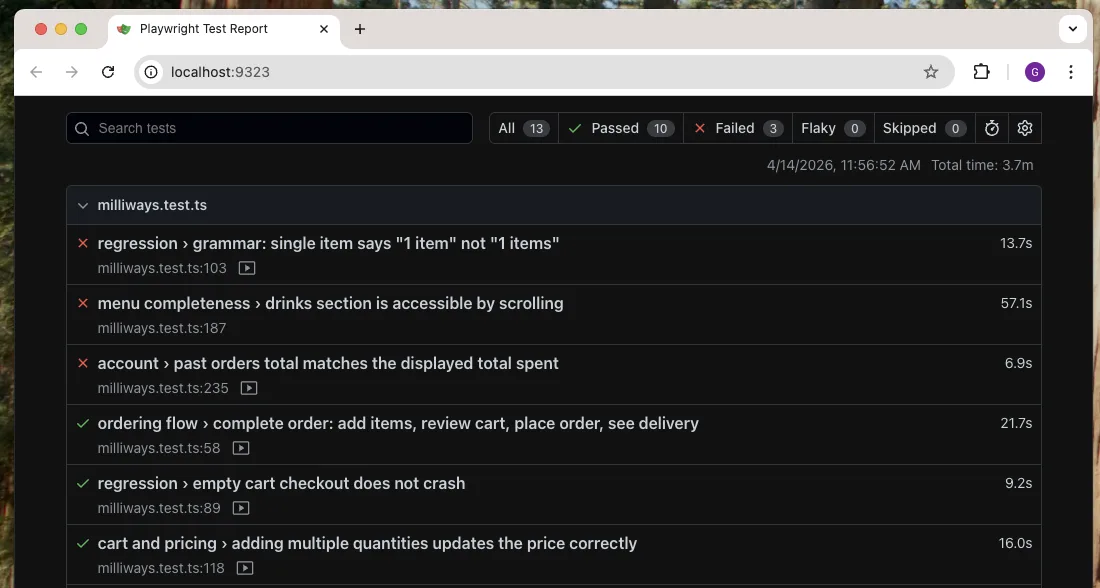
An HTML report that shows you what broke

Run with --reporter html to get screenshots and video for every test, plus the full accessibility tree as JSON when one fails. Open it with npx mobilewright show-report.

Mobilewright HTML report: 13 tests, 10 passed, 3 failed, each with duration and a recorded video

Auto-waiting, no sleeps

Each action waits until its element is visible, enabled and stable. Assertions keep retrying until they pass or time out.

await screen.getByRole('button', { name: 'Pay' }).tap();
await expect(screen.getByText('Paid')).toBeVisible();

Parallel, retried, sharded

Run workers in parallel, retry flaky tests and merge blob reports from sharded CI runs into a single report.

$ npx mobilewright test --workers 4 --retries 2
$ npx mobilewright merge-reports ./blob-reports

Video of every failure

Screenshots are taken automatically when a test fails. Turn on video recording and keep only the runs that broke.

test.use({
  bundleId: 'com.example.app',
  video: 'retain-on-failure',
});

WebViews, with the Playwright you know

Cordova, Capacitor, Ionic or a plain WKWebView: step into the DOM and get a Playwright-compatible Page.

const page = await screen.getByWebView().page();
await page.getByRole('button', { name: 'Pay' }).click();

Control the device, not just the app

Fake GPS, open deep links, rotate the screen and launch in any locale. It's the same API on iOS and Android.

await device.setGeolocation({ latitude: 40.71, longitude: -74.0 });
await device.goto('myapp://settings');
await device.launchApp('com.example.app', { locales: ['fr-FR'] });

Built for AI agents

Your agent needs a phone, not a screenshot.

From the makers of Mobile MCP. Mobilewright gives agents the same structured, deterministic view of the app that your tests get.

  • Accessibility tree, not pixels

    Agents read roles and labels straight from the device, so there's no vision model and no guessing coordinates. That also uses far fewer tokens than a screenshot.

  • The output is real code

    An agent's exploration turns into an ordinary Mobilewright test that you can review, commit and run in CI.

  • Any agent, any device

    Claude Code, Cursor, Copilot or your own agent, connected over MCP to a simulator, an emulator or a real phone in the cloud.

Add Mobile MCP to Claude, Cursor or any MCP client

{
  "mcpServers": {
    "mobile-mcp": {
      "command": "npx",
      "args": ["-y", "@mobilenext/mobile-mcp@latest"]
    }
  }
}

…and the agent drives the app with plain Mobilewright

// What the agent writes: readable and deterministic
await screen.getByRole('button', { name: 'Sign In' }).tap();
await screen.getByLabel('Email').fill('user@example.com');
await expect(screen.getByText('Welcome')).toBeVisible();

Powerful tooling

See what the test sees.

Point, click and copy the locator. The CLI does the rest.

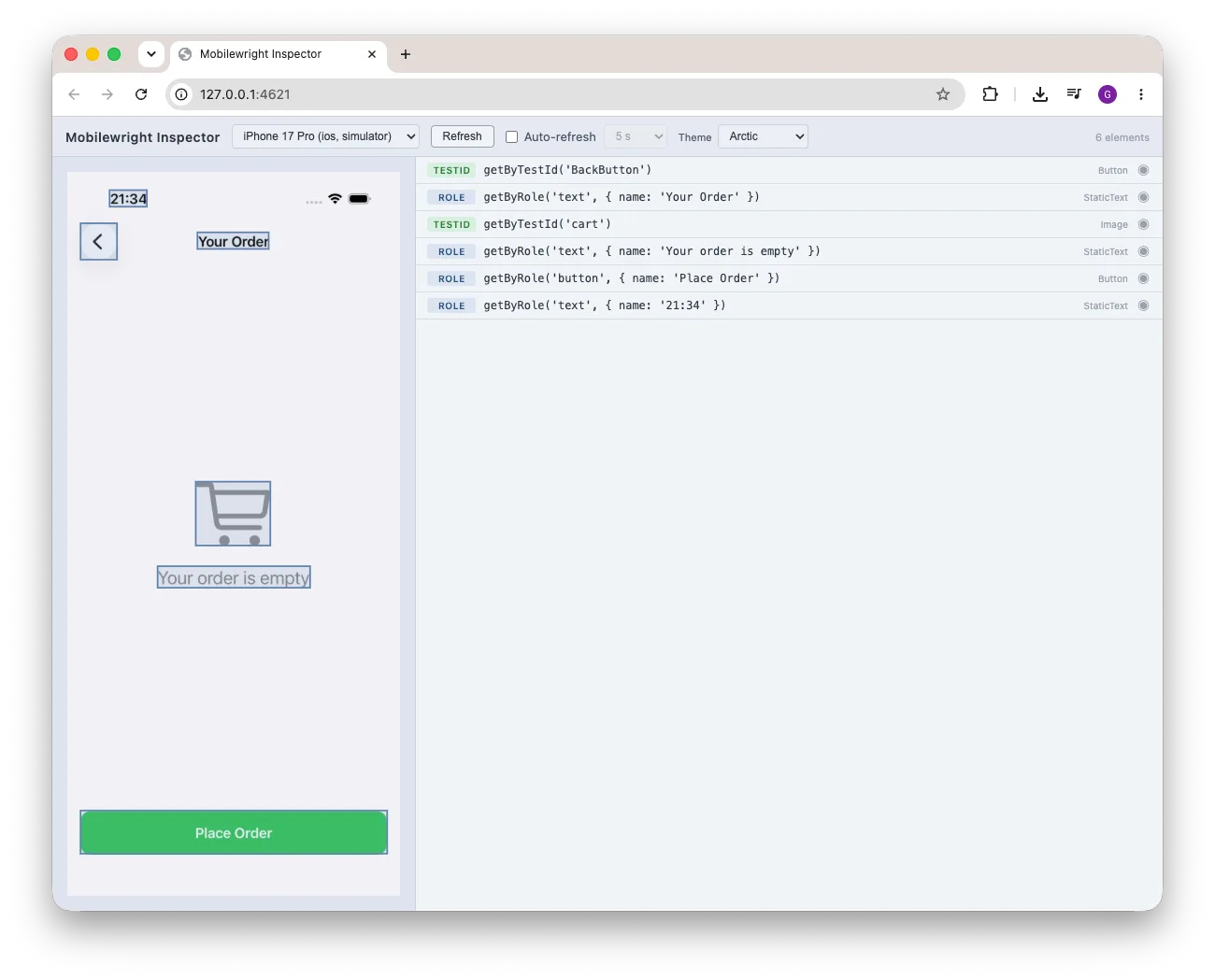
Mobilewright Inspector showing a live device screenshot beside its element list, each row with a suggested locator

Mobilewright Inspector

A live screenshot of your device next to every element on screen and the best locator for it: getByTestId, then getByRole, getByLabel, getByText. Click a row to highlight it. Duplicate locators are flagged before they make a test flaky.

$ npx mobilewright inspect

doctor

Checks Xcode, the Android SDK, simulators and ADB, and tells you exactly what's missing and how to fix it. Add --json for CI.

$ npx mobilewright doctor

screenshot

Grab a screenshot of any connected device, or pick one with -d.

$ npx mobilewright screenshot -o home.png
$ npx mobilewright screenshot -d <device-id>

devices

Lists every simulator, emulator and real device it can reach.

$ npx mobilewright devices
ID                                      Name            Platform  Type          State
00008110-0011281A112A801E               VPhone          ios       real-device   booted
5A5FCFCA-27EC-4D1B-B412-BAE629154EE0    iPhone 17 Pro   ios       simulator     booted

Runs anywhere

One API for every device and every framework.

Write the test once and run it on a laptop simulator, a phone on your desk, or hundreds of real devices on Mobile Next Cloud and other providers.

Devices
  • iOS simulators
  • Real iPhones & iPads
  • Android emulators
  • Real Android devices
  • Cloud device farms
Native
  • SwiftUI
  • UIKit
  • Jetpack Compose
  • Android Views
Cross-platform
  • React Native
  • Expo
  • Flutter
  • .NET MAUI
  • NativeScript
  • Kotlin Multiplatform
Hybrid
  • Cordova
  • Capacitor
  • Ionic
  • WKWebView / WebView

How it compares

Coming from Appium or Maestro?

DimensionMobilewrightAppiumMaestro
AuthoringTypeScript, Playwright-style APIWebDriver clients: Java, Python, Ruby, C#Declarative YAML flows
Setupnpm init mobilewrightServer + per-platform drivers + capabilitiesMaestro CLI
Auto-waitingEvery action and assertionManual implicit / explicit waitsBuilt in
Real iOS devicesYes, plus simulatorsYes, via XCUITest driverSimulators only
ReportingHTML, video, JUnit, JSON built inThird-party (Allure, runner reporters)JUnit + HTML; more via Maestro Cloud
AI agentsAccessibility tree, deterministic codeappium-mcp, vision-basedMCP server; AI commands experimental